What I use to set up this blog, specifically.
Run on
Theme & Plugins
Theme: Twenty Sixteen
Plugins:
- ActivityPub, to connect to the Fediverse. It automatically posts to Mastodon (or whatever) and imports comments from there to the blog post.
- Ad Inserter, which I use to automatically put the thing at the bottom of each post which explains how to comment/reply.
- Akismet Anti-spam, which blocks spammers from leaving comments all day.
- Hello Dolly, which randomly shows me a lyric from Hello, Dolly
- IndieWeb, which is basically an umbrella plugin for several other plugins:
- IndieAuth, which lets me use this domain to sign into other websites, basically.
- IndieBlocks, which has custom block types for indie web things (yet to be used).
- Micropub, which lets me publish to my site using Micropub clients (yet to be used).
Syndication Links, which lets me link to my Dreamwidth crosspost of the journal and wherever else I crosspost something.Got rid of this and am just manually linking to crossposted things now.Webmention, which lets people use webmentions if they want as a way to respond to a blog post.Switched to just using webmention.io since tbh I don’t think many people are going to be webmention-ing me.
- JournalPress, which crossposts my blog posts to my Dreamwidth journal.
- WP Super Cache, which makes a cached version of the blog to speed up loading times.
Custom CSS
I hacked together a bunch of stuff but this post from All About Basic was extremely helpful in figuring out how to change things. All these changes were made in the the Customize > Additional CSS section in the theme.
To Change Fonts
First you need to import whatever font you want; I use Bunny Fonts which’ll give you right CSS codes. Headers are Chewy, body fonts are Comic Neue (same as my website). Stick this code at the top and it’ll import the right fonts. I could NOT get the fonts to change without this, even after uploading them myself into the font folder.
@import url(https://fonts.bunny.net/css?family=chewy:400|comic-neue:300,300i,400,400i,700,700i);Then you need to change each thing individually (very annoying).
Body font:
.entry-title, .entry-title a {
font-family: "Chewy", display !important;
color: #b4a3c3
}

.entry-content, .entry-content a {
	font-family: "Comic Neue" !important;
	font-weight: 400;
	font-size: 16px !important;
  line-height: 1.6 !important;
}
Meta info, single entry view:
.single-post .entry-footer .cat-links a {
color: #b4a3c3 !important;
}

.single-post .entry-footer .tags-links a {
color: #b4a3c3 !important;
}
Meta info, homepage view:
.home .cat-links a, .home .tags-links a {
	color: #b4a3c3 !important;
}
Widgets in the sidebar:
.widget-title {
  font-family: "Chewy", display !important;
	color: #b4a3c3 !important;
}

.widget, .widget li a, .widget a {
font-family: "Comic Neue" !important;
font-weight: 400;
}
“Leave a reply” text above the comment section:
h2#reply-title {
font-family: "Chewy", display !important;
color: #b4a3c3
}
And previous/next blog post text:
.post-navigation a {
color: #1a1a1a;
display: block;
padding: 12px !important;
}

.post-navigation * {
font-family: "Chewy" !important;
}
Author Block at End of Post
To remove the author block from the end of each post:
.single-post .author-info {
  display: none;
}
Site Title/Banner Spacing
This removes the extra space at the top:
#masthead {
padding-top: 0px !important;
padding-bottom: 12px !important;
}
Change HR/Seperator Block Color & Style
A pain in the butt to do it every time, so I put this CSS styling instead:
/* Post separator - undo theme styles */
.entry-content hr::before,
.entry-content hr::after,
hr.styled-separator::before,
hr.styled-separator::after,
.entry-content hr,
hr.styled-separator {
  background: transparent;
}
/* Post separator - add new styles */
.entry-content hr,
hr.styled-separator {
  border-top: 3px dotted #778F99;
}
Graphics
Header image made by me, featuring a Lady Lovely Locks image
Background image was found on one of those Tumblr blogs that reposts background images lmao
Colors
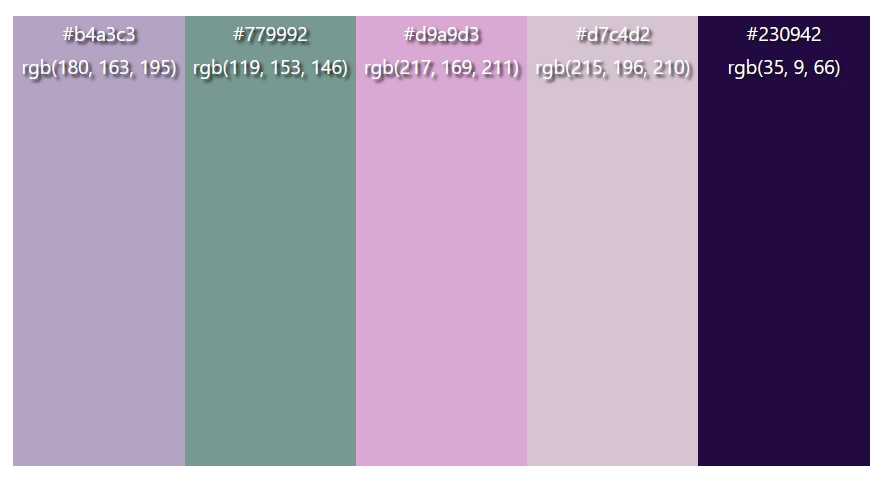
- #b4a3c3 – alt links/text (like meta stuff)
- #779992 – secondary text
- #d9a9d3 – link color
- #d7c4d2 – background color
- #230942 – main text